n8n Edit Image Node v2: What Changes in n8n 3.0
n8n 3.0 removed Edit Image versions 1 and 1.1, so those nodes now fail with "Edit Image versions 1 and 1.1 are no longer supported." Upgrading to version 2 fixes the error, but the output changes: migrated blurs come out about twice as strong, JPEGs roughly double in size, and Get Information returns a different shape. I ran the same ten operations through v1.1 on n8n 2.46.6 and v2 on 3.1.0 this morning and measured every file. Here's what changed and the settings that bring the old output back.
What Happens to Edit Image v1 Nodes on n8n 3.0?
They stop working, and it's not something you can patch around. The old node ran on GraphicsMagick through the gm npm package. In 3.0 the node keeps versions 1 and 1.1 in its version list so old workflows still open, but the execute path throws before it reads a single pixel. The binary is gone from the image too:
n8n 3.1.0, Edit Image node on typeVersion 1.1:

NodeOperationError: Edit Image versions 1 and 1.1 are no longer supported.
Upgrade the node to version 2.

# and the binary it used is gone from the image
$ docker run --rm --entrypoint sh n8nio/n8n:2.46.6 -c 'ls /usr/bin/gm'
/usr/bin/gm
$ docker run --rm --entrypoint sh n8nio/n8n:3.1.0 -c 'ls /usr/bin/gm'
ls: /usr/bin/gm: No such file or directory
So installing GraphicsMagick in a custom Dockerfile won't save you. The node itself refuses.
The nasty case is On Error set to continue. I had that on every test node. On 3.1.0 each v1.1 node logged the error and passed its input item straight through, binary included. The Write File node after it happily saved the original 113 kB photo under the name the edit was supposed to produce. No red node in the run, just unedited images landing in your bucket. If you use continue mode around image steps, check the outputs after the upgrade, not just the execution status. The same thinking applies to alerting: an error workflow never fires for an error you told the node to swallow.
What Changes Between Edit Image v1.1 and v2?
Version 2 is rebuilt on @napi-rs/canvas and @napi-rs/image. Most operations keep their parameters, so the migration looks harmless. I gave both versions the same two inputs (a sharp black-and-white edge for blur, a 1200×669 JPEG photo for everything else) and compared the files:
| Operation | v1.1 on 2.46.6 | v2 on 3.1.0 |
|---|---|---|
| Blur 5 / Sigma 2 (defaults) | 6 px edge | 12 px edge after migration |
| Blur 20 / Sigma 10 | 24 px edge | 50 px edge after migration |
| Blur 0 / Sigma 8 | 20 px edge | No blur at all |
| Resize to 600 px, JPEG, no quality set | 28.2 kB (~q75) | 59.9 kB (~q92) |
| JPEG, Quality 40 | 27.5 kB | 28.0 kB |
| PNG, Quality 10 | 735 kB | 912 kB, quality ignored |
| PNG, Quality 100 | 577 kB | 912 kB, RGBA |
| Output file name (JPEG in) | photo.jpg | photo.jpeg |
| Get Information | ~30 keys, format "JPEG" | 7 keys, format "jpeg" |
| Resize, width 0 | Silently skipped | Error |
| Text, Arial 40 px | Rendered | Same font, ~3 px higher |
Nine of eleven rows changed. Text was the pleasant surprise. The n8n image ships the Microsoft core fonts, both versions picked Arial, and the v2 text sits about 3 px higher and to the left. You won't notice unless you're aligning to a template.
Why Is My Image Blurrier After the Migration?
Because the migration maps the wrong field. v1 had two numbers: Blur (the GraphicsMagick kernel radius) and Sigma (how strong the blur actually is). v2 has one, Blur Radius, and it goes into a CSS blur filter, where the number is the standard deviation. That's Sigma's job. Here's what the migration does with them:
// n8n 3.1.0, breaking-changes/rules/v3/edit-image-version.js
function migrateEditImageBlurStep(step) {
    const migrated = { ...step };
    migrated.blurRadius = migrated.blur ?? 5;   // old "Blur" becomes the new radius
    delete migrated.blur;
    delete migrated.sigma;                       // Sigma is thrown away
    return migrated;
}

// v2/actions/blur.operation.js
context.filter = `blur(${blurRadius}px)`;      // CSS blur: the value is a standard deviation
It keeps Blur and throws away Sigma, which is backwards. I measured the 10–90% width of the blurred edge to put numbers on it:
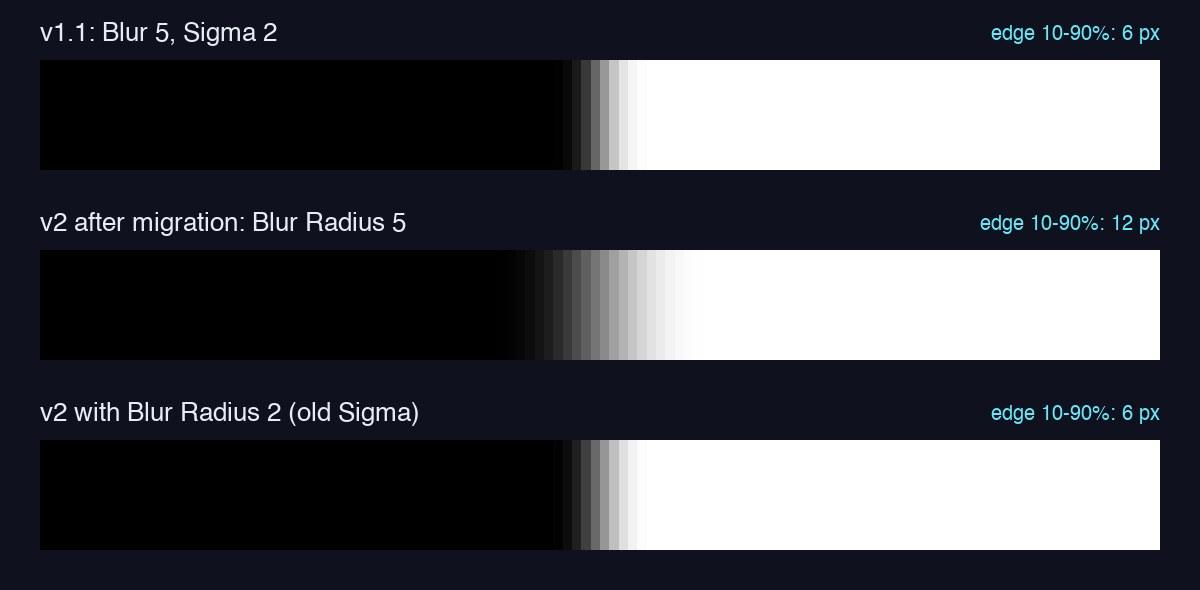
- Defaults (Blur 5, Sigma 2): 6 px in v1.1, 12 px after migration. Twice as soft.
- Blur 20, Sigma 10: 24 px became 50 px.
- Blur 0, Sigma 8:20 px became zero. In GraphicsMagick a radius of 0 means "pick one for me", so this was a perfectly normal setting. The migrated node copies the 0 and stops blurring entirely. If you blur faces or plates for privacy, that one matters.
The fix is to set Blur Radius to your old Sigma value. I re-ran all three with radius 2, 10 and 8, and the edges came back at 6, 24 and 20 px, identical to v1.1.
Why Are My JPEG and PNG Files Bigger?
JPEG:when you don't set Quality, v1 encoded at GraphicsMagick's default and v2 encodes at canvas's. I read the quantization tables of both files: v1.1's luminance table starts at 8, which is quality 75, and v2's starts at 3, roughly quality 92. A 600 px resize went from 28.2 kB to 59.9 kB, and the text overlay from 59 kB to 127 kB. With Quality set to 40 on both, they landed at 27.5 and 28.0 kB. So the fix is just to say what you want: Options > Quality = 75.
PNG:v2 ignores Quality for PNG and TIFF (the release notes say so), and it wrote my JPEG-sourced PNG as RGBA with an alpha channel nobody asked for. 912 kB at Quality 10 and at Quality 100, against 577 kB from v1.1. Funny enough, v1.1's Quality 10 gave a bigger file (735 kB) than Quality 100, because GraphicsMagick reads PNG "quality" as zlib level plus filter type. If you were tuning PNG size with that field, switch the format to WebP or JPEG.
File names: v2 writes JPEG output as photo.jpeg even when the input was photo.jpg and you didn't change the format. v1.1 kept .jpg. Any later node that builds a path from fileName or filters on .jpg needs a look.
What Does Get Information Return in v2?
A much smaller object. v1.1 returned GraphicsMagick's identify dump; v2 returns seven keys:
// v1.1 (GraphicsMagick identify), 30 top-level keys, including:
{ "Format": "JPEG (Joint Photographic Experts Group JFIF format)",
  "format": "JPEG", "Geometry": "1200x669",
  "size": { "width": 1200, "height": 669 },
  "depth": 8, "Filesize": "...", "JPEG-Quality": "...",
  "Channel Statistics": { ... }, "Compression": "...", ... }

// v2 (@napi-rs/image), the whole output:
{ "size": { "width": 1200, "height": 669 },
  "format": "jpeg", "colorType": "rgb", "bitDepth": 8,
  "channels": 3, "hasAlpha": false, "fileSize": 113299 }
size.width and size.height are the only fields that kept their name and value. format kept its name but went lowercase, so an If node checking {{ $json.format === "JPEG" }} now goes down the false branch every time. Geometry, Filesize, JPEG-Quality and the channel statistics are gone. If you used the statistics to catch blank or black images, compute that in a Code node now.
How Do I Migrate Edit Image Nodes Safely?
Do it before the major upgrade. Edit Image v2 already ships in n8n 2.46.x, and every file it produced on 2.46.6 was byte-identical to the same node on 3.1.0. That gives you a window to compare old and new output side by side on the version you run today.
- Find them. On 2.46.x, Settings > Migration Report has an
edit-image-version-v3rule. I covered what that report misses in n8n 3.0 Migration Report: What It Misses. Its "migrate" button applies the blur mapping above, so run it and then fix the numbers. - Blur: set Blur Radius to the old Sigma. Check every Multi Step node too, since the migration rewrites blur steps inside them the same way.
- JPEG: add Quality explicitly to every node that outputs JPEG.
- Get Information: search your expressions for
Geometry,Filesize,JPEG-Qualityand uppercase format checks. - Resize: v1.1 quietly skipped a width of 0 and passed the image through unresized. v2 returns
Resize width and height must be greater than zero. If a dimension comes from an expression, guard it. - Then upgrade. The rest of the 3.0 list is in my n8n 3.0 breaking changes post. Export your workflows first; if you don't have Git sync, the setup in n8n version control without Enterprise takes ten minutes.
One gap worth knowing about: the official Edit Image docs still tell you to install GraphicsMagick and still describe the Sigma field as of today. The 3.0 breaking changes page is the current one. It warns that blur can look different, but not by how much or which way.
FAQ
Why does n8n say Edit Image versions 1 and 1.1 are no longer supported?
n8n 3.0 removed the GraphicsMagick-based versions of the Edit Image node, and the 3.x Docker image no longer includes the gm binary. Any node still on typeVersion 1 or 1.1 fails at run time. Open the node and upgrade it to version 2, or migrate it from Settings > Migration Report.
Why is my image blurrier after upgrading the Edit Image node?
The migration copies the old Blur value into Blur Radius, but v2 treats that number as a Gaussian sigma. With the default Blur 5 and Sigma 2, the edge went from 6 px to 12 px wide in my test. Set Blur Radius to the old Sigma value instead.
Why are Edit Image JPEG files bigger in n8n 3.0?
Without a Quality option, v1 encoded JPEG at about quality 75 and v2 encodes at about 92. A 600 px resize grew from 28.2 kB to 59.9 kB. Set Options > Quality explicitly; at Quality 40 both versions produced files within 2% of each other.
Can I install GraphicsMagick to keep using Edit Image v1 on n8n 3.0?
No. The v1 code path is gone from the node, not just the binary. On n8n 3.1.0 the node throws before it touches an image, so adding gm to a custom image doesn't help. Upgrade the node to version 2.
Does Edit Image v2 work on n8n 2.x?
Yes. n8n 2.46.6 already ships version 2 next to 1.1, and every file v2 produced on 2.46.6 was byte-identical to the same node on 3.1.0. That makes 2.46 the safe place to migrate and compare output before the major upgrade.
How I Tested This
Everything ran on November 9, 2026 on my Mac mini in throwaway Docker containers: n8nio/n8n:2.46.6 (the stable tag I had cached) and n8nio/n8n:3.1.0. I generated two workflows, one with ten Edit Image 1.1 nodes and one with the same ten on version 2 using the parameters the migration produces. Each ran through n8n executewith a Read File node in front and a Write File node behind, and I read errors and Get Information output from the execution data. Blur strength is the 10–90% rise width across a hard edge in row 200 of each output, measured with Pillow and NumPy. JPEG quality is inferred from the quantization tables, so treat 75 and 92 as close estimates. The migration mapping and the v1 error come straight from the 3.1.0 source. One honest note: my own 190-workflow instance has zero Edit Image nodes, so I didn't have a real workflow to break. These are bench tests, but the numbers are real files from the real node.
Upgrading a Busy n8n Instance to 3.0?
I audit n8n instances before major upgrades, migrate the nodes that break, and check the output, not just the green checkmarks. Send me your setup and I'll tell you what 3.0 will touch.
Related Posts
n8n
n8n 3.0 Migration Report: What It Misses
I planted 12 breaks, ran the Migration Report on n8n 2.45.7 and 2.46.3, then booted the same database on 3.0.1. Stable missed LangChain Code, Edit Image v1 and the Slack signing secret; a 70-second Code node and a Tailscale call passed as compatible on both.
n8n
n8n SSRF Protection: What It Blocks and How to Allow It
I sent 15 URLs through n8n 2.47.7 and 3.2.2 with SSRF protection off and on. The block list caught DNS and IP-encoding tricks, 3.x now blocks Tailscale, AI nodes hide the SSRF error, and dropping the default keyword reopens localhost.
n8n
n8n 3.0 Breaking Changes: What Actually Breaks
n8n 3.0 drops npm installs, AI Agent node v1, and three legacy nodes. I audited 182 production workflows against the full removal list — 12 nodes flagged, 11 needed a version bump, exactly 1 needed a rewrite.